> For the complete documentation index, see [llms.txt](https://docs.nuvens.cloud/llms.txt). Markdown versions of documentation pages are available by appending `.md` to page URLs; this page is available as [Markdown](https://docs.nuvens.cloud/admin/configuration-section/settings/workspaces-ec2.md).
# WorkSpaces (EC2)
The **WorkSpaces (EC2)** settings page allows administrators to enable and manage EC2 backed WorkSpaces.
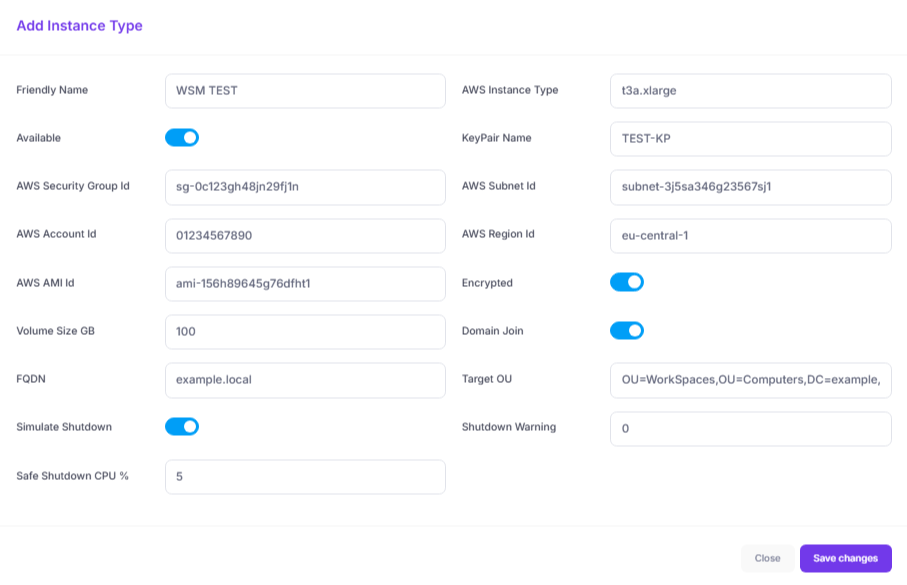
To configure a **WorkSpaces EC2** instance, click on **Add Instance Definitions**. This takes you to the page where you can enter all the required details for your EC2 WorkSpace setup—including:
* **Friendly Name** for easy reference
* **AWS Instance Type** (e.g., `t3a.xlarge`)
* **AWS Account ID** and **AWS Region**
* **AMI ID**, **Subnet ID**, and **Security Group ID**
* **Key Pair Name** for administrative access
* **Volume Size (GB)** and **Encryption** settings
* **Domain Join** configuration
* **FQDN** and **Target OU** for domain joining (required when Domain Join is enabled)
* **Safe Shutdown CPU %** Defines the maximum CPU utilisation allowed for a scheduled shutdown to proceed. If the instance is using more CPU than this value, the shutdown will be delayed by **30 minutes** and the user will receive an **email notification**.
* **Shutdown Warning** period (**in minutes**) that users will be notified before a scheduled shutdown occurs.
* **Simulate Shutdown** option for testing automated shutdown behaviour
{% hint style="warning" %}
To manage an **EC2 Instance** as a WorkSpace, the following tag must be applied:
* **Tag Name:** `WSM-Managed`
* **Tag Value:** `true`
If the tag is not present, the instance will not be discovered or managed by WorkSpaces Manager.
{% endhint %}
The **Add Schedule Definition** feature allows administrators to define automatic start and stop times for the EC2-based WorkSpaces, helping to optimize cost and resource usage. You can create custom schedules by setting stop and start times for weekdays, Saturday, and Sunday individually.
For example, a schedule like "Mon–Fri Stop at 5pm" ensures that EC2 WorkSpaces are shut down at the end of the workday—reducing compute costs without requiring manual intervention.
---
# Agent Instructions
This documentation is published with GitBook. GitBook is the documentation platform designed so that both humans and AI agents can read, navigate, and reason over technical content effectively. Learn more at gitbook.com.
## Querying This Documentation
If you need additional information that is not directly available in this page, you can query the documentation dynamically by asking a question.
Perform an HTTP GET request on the current page URL with the `ask` query parameter, and the optional `goal` query parameter:
```
GET https://docs.nuvens.cloud/admin/configuration-section/settings/workspaces-ec2.md?ask=&goal=
```
`ask` is the immediate question: it should be specific, self-contained, and written in natural language.
`goal` is optional and describes the broader end goal you are ultimately trying to accomplish on behalf of the user. GitBook uses it to tailor the answer towards what is most useful for that goal.
The response will contain a direct answer to the question and relevant excerpts and sources from the documentation.
Use this mechanism when the answer is not explicitly present in the current page, you need clarification or additional context, or you want to retrieve related documentation sections.