> For the complete documentation index, see [llms.txt](https://docs.nuvens.cloud/llms.txt). Markdown versions of documentation pages are available by appending `.md` to page URLs; this page is available as [Markdown](https://docs.nuvens.cloud/admin/admin-section/workspaces-ec2.md).
# WorkSpaces EC2
The **WorkSpaces EC2** tab provides a central view for managing EC2-backed WorkSpaces instances. You can see the instance name, state, AWS region, current user, IP address, compute type, and any configured power schedule.
From this page you can also **start**, **stop** and **reboot** EC2 WorkSpaces instances, as well as **synchronise**, **enable**, or **disable schedules** in bulk. The current schedule assigned to each instance is displayed, making it easy to identify when instances are configured to automatically start or stop.
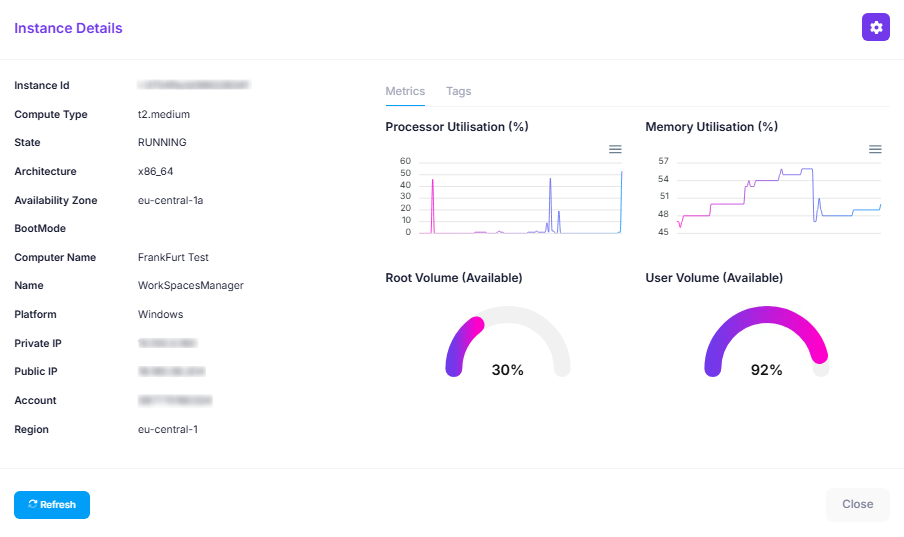
Each instance can also be opened in more detail by clicking its name. This brings you to the **Instance Details** page. Here you can view real time CPU and Memory Utilisation, check the availability of root and user volumes, and access additional metadata such as account ID, availablity zone and public/private IPs. You can also view, add or remove tags as needed.
{% hint style="warning" %}
To view real-time metrics the [WSM Performance Monitor agent](https://install.nuvens.cloud/overview/workspaces-performance-monitor-agent) must be installed on the instance. Without the agent data will not be available in the Instance Details view.
{% endhint %}
You can also adjust scheduling by editing the **EC2 Schedule**, This allows you to define specific working hours (e.g., weekdays 09:00–19:00) to control when instances automatically start and stop. To configure a schedule for an EC2 WorkSpace, click the **Modify Schedule** icon in the **Actions** column for the required instance. Scheduled automation like this helps optimize performance and reduce unnecessary costs by ensuring EC2 instances only run when needed.
---
# Agent Instructions
This documentation is published with GitBook. GitBook is the documentation platform designed so that both humans and AI agents can read, navigate, and reason over technical content effectively. Learn more at gitbook.com.
## Querying This Documentation
If you need additional information that is not directly available in this page, you can query the documentation dynamically by asking a question.
Perform an HTTP GET request on the current page URL with the `ask` query parameter, and the optional `goal` query parameter:
```
GET https://docs.nuvens.cloud/admin/admin-section/workspaces-ec2.md?ask=&goal=
```
`ask` is the immediate question: it should be specific, self-contained, and written in natural language.
`goal` is optional and describes the broader end goal you are ultimately trying to accomplish on behalf of the user. GitBook uses it to tailor the answer towards what is most useful for that goal.
The response will contain a direct answer to the question and relevant excerpts and sources from the documentation.
Use this mechanism when the answer is not explicitly present in the current page, you need clarification or additional context, or you want to retrieve related documentation sections.
.png?alt=media&token=eec5a01c-4334-43bc-bd77-c8edd9da4be4)